CAPTUR3D Alternative for Branded Virtual Tours
Compare CAPTUR3D-style branded virtual tours with Real Horizons for flexible splat generation, guided tours, embeds, and reporting.

Compare CAPTUR3D-style branded virtual tours with Real Horizons for flexible splat generation, guided tours, embeds, and reporting.
Frame the decision around branding, embeds, lead capture, reporting, and whether the source media is locked to one capture system.
Short answer
CAPTUR3D is relevant when a team already uses Matterport and wants a richer presentation or property-marketing layer around that ecosystem. Spatial Studio is the stronger alternative when the team wants to change the reconstruction and capture model itself, not only improve what happens after a Matterport scan.
That distinction prevents a false comparison. CAPTUR3D can complement an existing Matterport operation. Spatial Studio can become the main route from flexible capture to a branded Gaussian splat tour.
Start with the dependency question
| Question | If the answer is yes | Why it matters |
|---|---|---|
| Do clients require Matterport spaces? | Keep Matterport and evaluate CAPTUR3D around it. | The upstream deliverable is already decided. |
| Do you want to reduce reliance on one capture ecosystem? | Evaluate Spatial Studio. | Capture can move across iPhone, 360, drone, photos, PortalCam, and existing splats. |
| Is branded property presentation the main gap? | Compare both on a finished listing. | The quality of the handoff may matter more than the reconstruction choice. |
| Do you need local splat reconstruction? | Evaluate Spatial Studio for Mac. | The project can stay on Apple silicon until publishing is needed. |
When CAPTUR3D makes sense
An agency with a productive Matterport team may not want to replace capture at all. The immediate problem could be brand presentation, listing context, lead capture, or the way a portfolio is shown to clients. A product designed to extend that established workflow can be less disruptive than retraining the operation.
The evaluation should include the full dependency chain. Confirm which Matterport plan or space is required, what happens if a tour is archived, how branding appears, and which data can be exported. The add-on price is only one part of the lifetime cost.
When Spatial Studio is the larger strategic move
Spatial Studio changes the center of the stack. Spatial Lens can guide an iPhone capture. Spatial Studio for Mac supports local Apple silicon reconstruction. The web platform handles cloud generation and authoring from phone, image, 360, drone, PortalCam, or existing splat sources.
The agency can then add a first view, guided waypoints, floor plans, 3D maps, photos, video, hotspots, embeds, CTAs, and analytics in the same system. This is valuable when the goal is not to decorate a fixed capture workflow but to let each property use the most sensible source.
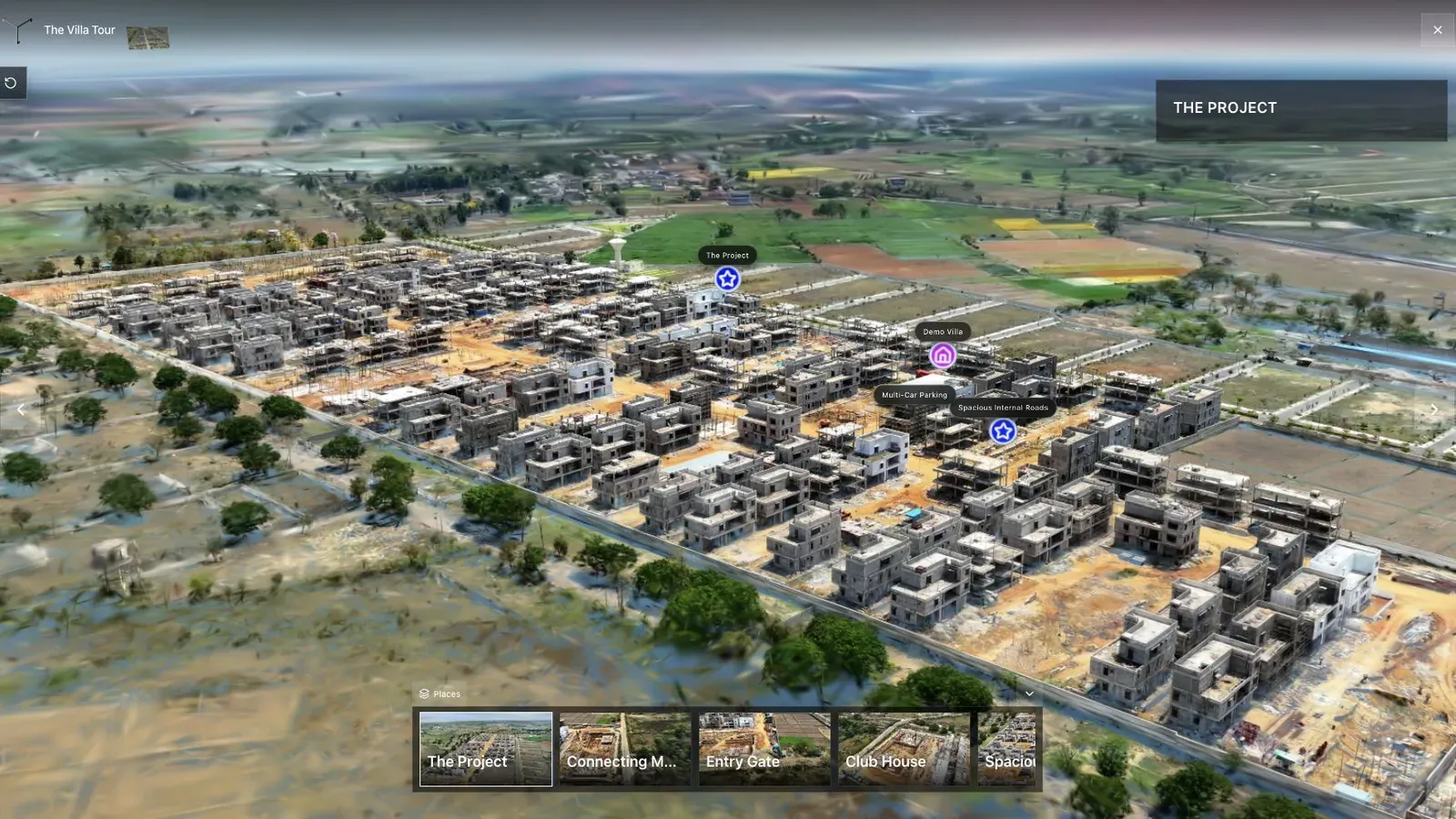
A land or developer project exposes the difference between extending a scan and building a complete spatial sales experience.
Compare the switch in phases
Do not move an entire portfolio at once. Keep existing Matterport work stable, then use Spatial Studio on one new listing where flexible capture or richer context matters. Compare production time, client feedback, mobile experience, revisions, and lead visibility.
If Spatial Studio wins, define which job types move first. Developer launches and exterior-led properties may benefit sooner than standardized residential scans. A phased service menu protects revenue while the team learns a new capture SOP.
Questions for the final demo
- What does the agent receive, and how much of the platform brand remains visible?
- Can the tour live inside the agency's own website and campaign pages?
- What happens to the public link if the underlying subscription changes?
- Can the team see meaningful interactions rather than a vanity view count?
- How does a photographer repair or republish a weak scene?
Use the same property and client brief in both demonstrations. A polished vendor sample does not reveal the work required on your own difficult capture.
Frequently asked questions
Is Spatial Studio a CAPTUR3D replacement?
It can replace many branded real-estate tour workflows, but the products enter the stack differently. CAPTUR3D is closely associated with enhancing Matterport-based delivery. Spatial Studio covers flexible capture, splat generation, authoring, and publishing.
Can Spatial Studio still work with professional capture hardware?
Yes. XGRIDS PortalCam is one supported path, alongside iPhone, 360 cameras, drones, photo sets, and existing splats.
Which option is better for an agency leaving Matterport?
Spatial Studio is the more relevant comparison because it can replace more of the upstream capture and reconstruction workflow. Validate measurement and documentation requirements separately.
Related reading
Next step
Open the related workflow.
Review live examples or move straight into the matching Spatial Studio flow.
Continue reading
Related articles
Tool Comparisons
Gaussian Splatting Software Compared: 15 Tools for 2026
Compare 15 Gaussian splatting tools for capture, generation, editing, hosting, 360 video, local Mac training, and published 3D tours.
Read articleTool Comparisons
Best Gaussian Splatting Apps for Mac in 2026
Compare Gaussian splatting apps for Mac, including Spatial Studio, RadianceKit, 3D Splat App, OpenSplat, and cloud alternatives by workflow and export needs.
Read article