Realsee vs Matterport vs Spatial Studio
Compare Realsee, Matterport, and Spatial Studio by capture ecosystem, branded publishing, splat support, and tour handoff.

Compare Realsee, Matterport, and Spatial Studio by capture ecosystem, branded publishing, splat support, and tour handoff.
Compare standardized capture ecosystems against a flexible generation-and-tour workflow for branded property experiences.
Short answer
Realsee and Matterport make the most sense when a standardized capture ecosystem is part of what the buyer wants. Spatial Studio makes more sense when the team wants to choose capture hardware per project and own a flexible Gaussian splat publishing workflow.
Matterport has the strongest category recognition. Realsee is a serious alternative for property digitization teams evaluating its capture hardware and tour system. Spatial Studio is the broadest option here for mixed inputs: Spatial Lens on iPhone, local reconstruction on Mac, cloud processing on the web, and support for phone, photo, 360, drone, PortalCam, or existing splat files.
The decision in one table
| If this is the priority | Start with | What to verify |
|---|---|---|
| Clients request a familiar digital-twin brand | Matterport | Hosting, add-ons, export rights, and listing-level margin. |
| A standardized property digitization kit fits the operation | Realsee | Local availability, hardware terms, plan limits, and support. |
| Capture flexibility plus a branded splat tour | Spatial Studio | The exact capture preset, mobile result, and publishing workflow. |
| Survey or facilities requirements | A specialist scanning stack | Measurement accuracy, documentation needs, and contractual formats. |
The last row is important. A beautiful marketing tour and a survey deliverable are not interchangeable. Choose against the client brief, not the visual demo.
Where Matterport remains strong
Matterport solves an explanation problem. Agents, facilities teams, and property owners often know the name before the photographer arrives. Its standardized scan language and wider digital-twin ecosystem can reduce sales friction when familiarity is valuable.
That same standardization can create operating constraints. Model the real cost of active spaces, optional outputs, the chosen camera, and staff time. If the margin still works and clients ask for Matterport, there is no reason to switch only because splats are newer.
Where Realsee belongs
Realsee should be evaluated as an ecosystem, not a viewer thumbnail. The relevant questions concern access to its capture hardware, the production process in your region, the outputs clients receive, and how a brokerage handles hosting or updates after delivery.
Ask for a complete local demonstration using a property similar to the ones you sell. A model apartment with clean walls is not enough if your actual portfolio includes reflective retail, large villas, or outdoor transitions.
Why Spatial Studio is a different kind of alternative
Spatial Studio separates the capture decision from the delivery contract. A small listing can begin on an iPhone. A creator can iterate privately on a Mac. A larger job can use the cloud. A site may arrive from a 360 camera, drone, DSLR set, XGRIDS PortalCam, or a splat produced elsewhere. The finished experience still lives in the same web authoring system.
That system adds guided routes, hotspots, maps, floor plans, supporting media, branded links, embeds, CTAs, and analytics. The practical advantage is not a longer feature list. It is the ability to change the capture source without changing what the agent or developer receives.
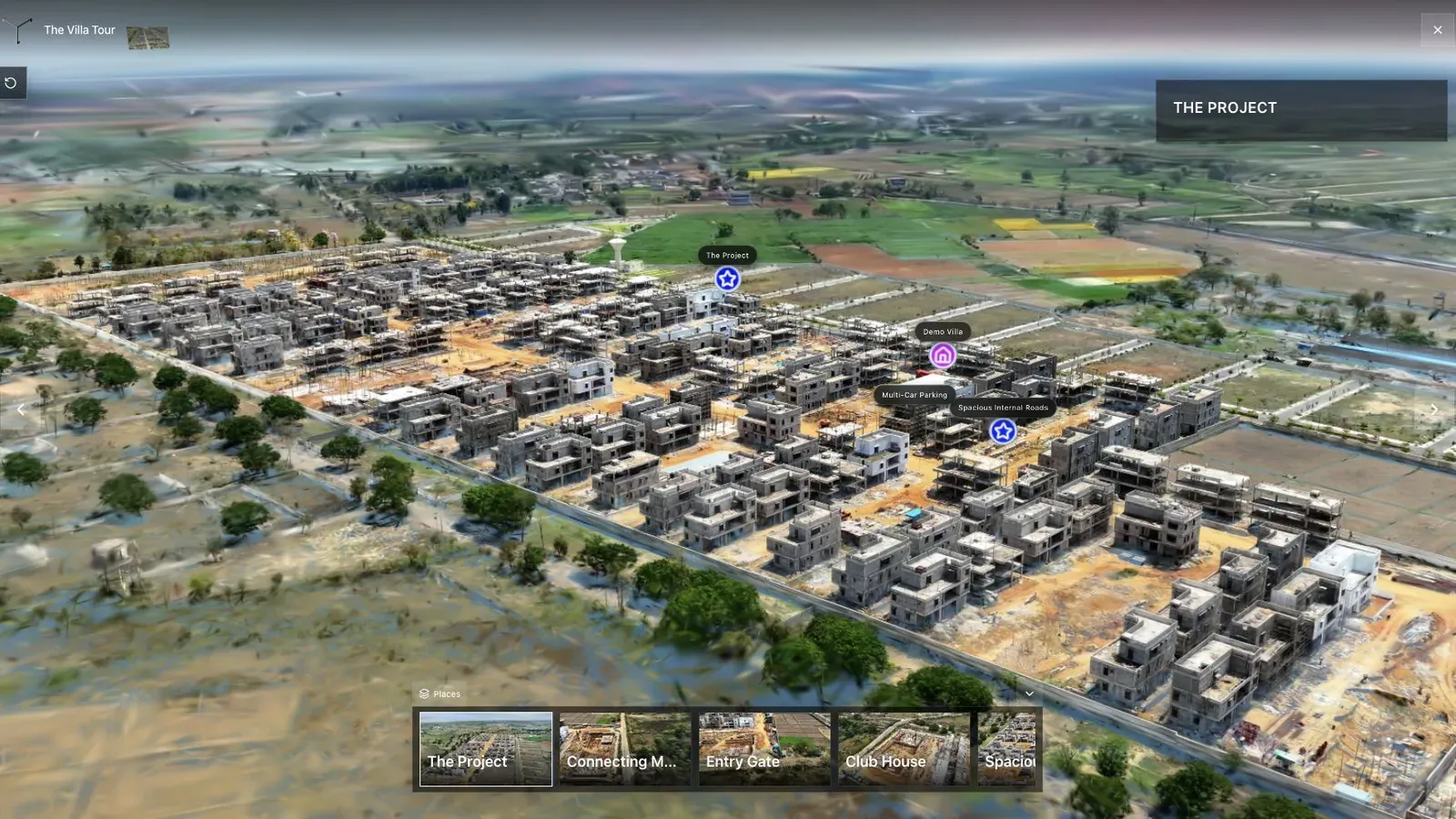
A development needs more than an interior scan when access, plots, and surroundings affect the sale.
Run a portfolio test, not a demo test
Pick three recent jobs: an ordinary residential listing, a premium or developer project, and the most difficult space your team captured this quarter. Price each workflow from arrival on site through the last month of hosting.
Record capture time, processing wait, repairs, publishing effort, client revisions, mobile quality, and ongoing cost. Then ask the sales team which result is easiest to explain. This produces a decision grounded in the business you already run.
Frequently asked questions
Is Spatial Studio a direct Matterport replacement?
It replaces many real-estate marketing workflows, but it is not a drop-in substitute for every Matterport measurement, facilities, or partner requirement.
Does Spatial Studio require proprietary hardware?
No. It supports multiple capture paths, including iPhone, regular video, photo sets, 360 media, drone footage, PortalCam, and existing splats.
Which option gives an agency more capture flexibility?
Spatial Studio is the most capture-flexible option in this comparison. Matterport and Realsee can be stronger when their standardized hardware ecosystem is exactly what the operation wants.
What should a brokerage compare first?
Compare the finished property link, the recurring cost, how updates are handled, brand control, mobile behavior, and whether the tour produces useful lead signals.
Related reading
Next step
Open the related workflow.
Review live examples or move straight into the matching Spatial Studio flow.
Continue reading
Related articles
Tool Comparisons
Matterport Pro3 Alternative for Real Estate Media Teams
Explore Matterport Pro3 alternatives for real estate teams using mixed capture sources, splats, branded tours, and browser delivery.
Read articleTool Comparisons
Gaussian Splatting Software Compared: 15 Tools for 2026
Compare 15 Gaussian splatting tools for capture, generation, editing, hosting, 360 video, local Mac training, and published 3D tours.
Read article