Skip to content

A Matterport alternative built on video.

Spatial Studio turns 360, drone and phone video into Gaussian splat tours that visitors can walk through, then publishes a branded link or embed with view analytics. Keep Matterport for the jobs that need it and open those tours from inside yours.

When to stay, when to switch.

Matterport is still the right call for some jobs. Many agencies run both and choose per property.

Keep Matterport

When the job needs a standard scan

  • Clients ask for Matterport by name, or a contract requires it.
  • You rely on the dollhouse view and Matterport’s standard floor plans.
  • The client needs measurements accurate enough for documentation.
  • Your team already captures large buildings quickly with a Pro3.
Use Spatial Studio

When the property needs more than rooms

  • You already own a 360 camera, a drone or a good phone.
  • Clients want grounds, exteriors and neighbourhood context, not only rooms.
  • Hosting each space every month eats the margin on smaller listings.
  • You want your own branding, a website embed and view analytics on every tour.

What you pay each month.

Matterport’s plans page lists Professional as its entry paid plan, from 10 active spaces. Spatial Studio pricing in your region is available on request.

5 active tours

Matterport: No 5-space plan

Entry paid plan starts at 10 spaces

Spatial Studio Starter

200 credits a month, no watermark

10 to 20 active tours

Matterport: $90 to $125 a month

$108 to $150 billed monthly

Spatial Studio Pro

Up to 20 tours, 1,000 credits, your logo

75 active tours

Matterport: $345 a month

$414 billed monthly

Spatial Studio Studio

75 tours, 3,000 credits, no Real Horizons branding

Matterport prices are its yearly billing per month, from matterport.com/plans, checked 19 October 2026. Matterport plans include processing of each space; in Spatial Studio, turning footage into a 3D scene uses credits, and a five-minute capture at high quality uses about 40. Ask about pricing in your region.

Capture with what you own.

Matterport also works with some 360 cameras and iPhones, but it captures from fixed scan points. Spatial Studio works from video, so you walk or fly the route once and the whole path becomes part of the tour.

What your client actually sees.

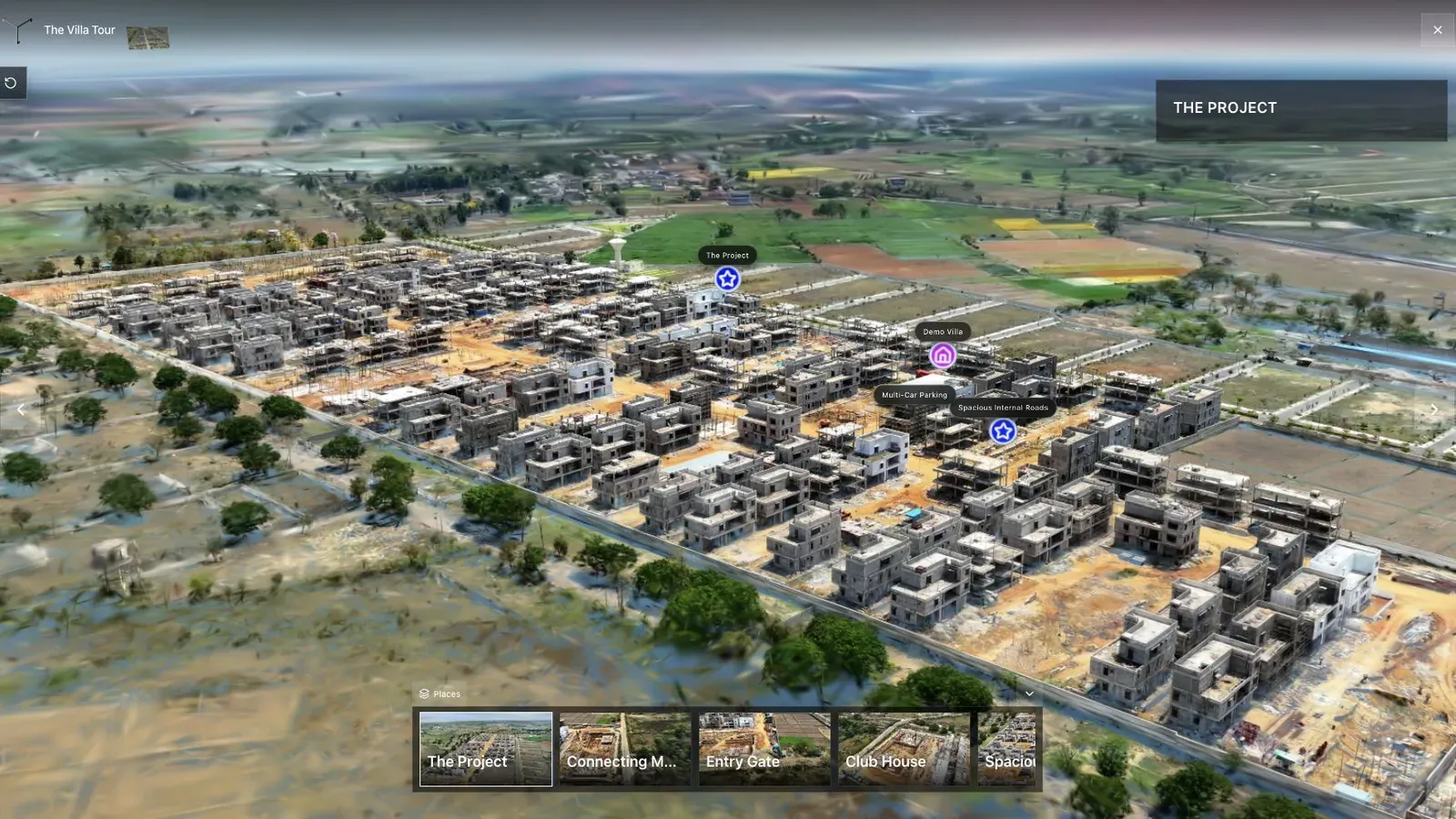
A drone exterior with hotspots, rooms the visitor can walk through, floor plans and Google 3D Maps for context, and a call to action on every stop. Then views, visitors and clicks for each tour.

A published Spatial Studio drone tour of a villa development with hotspots and a scene strip

Keep your Matterport tours.

You do not have to switch everything at once. Put a hotspot on a drone exterior that opens the Matterport interior you already scanned, then move new jobs over as your capture routine settles.

Switch one job at a time.

Run a few controlled jobs before you change what you sell.

  1. 01

    Pick three test jobs

    A small interior, a tricky reflective or low-light space, and an exterior-led site.

  2. 02

    Set one capture route

    Write down the camera, route, settings and walking speed so every operator repeats it.

  3. 03

    Check it on a phone

    Open the published tour on the phones your clients use before you send the link.

  4. 04

    Price the package

    Add capture time, processing, hosting and revisions, then divide by paid jobs.

Honest limits.

Test these on your own properties before you promise a client a result.

  • Splats need careful capture. Glass, mirrors and moving people cause artifacts.
  • Interiors depend on capture discipline more than on the camera you use.
  • Measurements are useful for marketing and planning, not survey grade.
  • There is no dollhouse view. Floor plans and maps do that job instead.

Questions, answered.

Is there a free Matterport alternative?

Spatial Studio has a free plan with the editor and one live tour, which is enough to build and publish a tour from files you already have. Turning your own footage into a 3D scene uses credits, which come with paid plans and the 7-day Starter trial.

Can I use my Insta360 or drone instead of a Matterport camera?

Yes. Spatial Studio builds tours from video, so a 360 camera such as an Insta360 or DJI Osmo 360, a drone, a DSLR or a phone can all be the source. Slow, steady capture with good overlap matters more than the device.

Can I keep my existing Matterport tours?

Yes. A hotspot in a Spatial Studio tour can open an existing Matterport tour, so you can add a drone exterior or neighbourhood context around an interior you already scanned. This links the Matterport tour; it does not import Matterport scan data.

Does Spatial Studio do floor plans and measurements?

Yes. You can add floor plans, measure inside the tour and combine the 3D scene with 360 panoramas and Google 3D Maps. Measurements are suited to marketing and planning rather than survey work.

How much does one tour cost in credits?

A five-minute capture at high quality uses about 40 credits. Starter includes 200 credits a month and Pro includes 1,000, and unused Pro credits roll over up to 1,200.

Can I remove the Spatial Studio branding?

Paid plans remove the watermark. Pro adds your own logo in the viewer, and the Studio plan removes Real Horizons branding from the viewer.

Do the tours work on phones?

Yes. Published tours open in mobile browsers without an app. Check heavy scenes on a mid-range phone before sending the link to a client.

Try it on one real property.

Upload a capture you already have, build the tour and open it on a phone before you decide.