Insta360 X6 Gaussian Splatting: Spatial Capture and 3DGS Guide
Learn how Insta360 X6 Spatial Capture makes a Gaussian splat, what X5 and X4 support, and how to turn 360 footage into a client-ready 3DGS tour.

Learn how Insta360 X6 Spatial Capture makes a Gaussian splat, what X5 and X4 support, and how to turn 360 footage into a client-ready 3DGS tour.
Insta360 X6 can now turn a supported 360 capture into a Gaussian-splat model inside the Insta360 app. That makes 3DGS easier to try, but capture quality, export options, editing, and the final tour still decide whether the result is useful.
The short answer
Yes. Insta360's official X6 page says its new Spatial Capture workflow can capture an object or space in 360, import the recording into the Insta360 app, and generate a 3D Gaussian-splat model that you can explore from different viewpoints.
This is a real 360-to-3DGS product feature, not an inference from the camera's resolution. Insta360 also says Spatial Capture currently supports X6, X5, and X4 in selected modes, with regional limitations.
That does not make every X6 recording a finished virtual tour. The in-app model is one output path. A commercial property, venue, heritage, or construction workflow may also need file access, quality review, weak-area cleanup, waypoints, hotspots, a branded link, website embeds, and analytics. Spatial Studio is built around that longer path: process supported capture media, inspect the scene, and publish it as a guided browser tour.
Already have X6 footage? Export a complete 2:1 360 video, then test it in Real Horizons' Spatial Studio. The 360-handheld workflow is built for Insta360, DJI Osmo 360, and other spherical cameras, with cloud generation, quality and LOD choices, downloadable output, and guided-tour publishing in one workspace.
What Insta360 officially confirmed
As of August 13, 2026, Insta360 lists these X6 features on the official product page:
- Spatial Capture that generates a 3D Gaussian-splat model in the Insta360 app.
- Support for X6, X5, and X4 in selected Spatial Capture modes, with some regional exclusions.
- Native 8K50fps 360 video.
- Dual custom 1/1.1-inch Sony sensors that Insta360 describes as providing a 1-inch-equivalent imaging area for 360 capture.
- 10-bit color, I-Log, and in-camera Dolby Vision.
- 120MP 360 photos.
- A 2.32-inch OLED display.
- A 2,600 mAh battery with a claimed 140-minute 8K runtime under Insta360's lab conditions.
- Replaceable Lenses 2.0 and a triple-chip imaging system.
Those specifications matter because low noise, clean detail, consistent exposure, and stable high-resolution footage can help camera registration. They do not replace a careful route or prove that one camera will win every reconstruction test.
Sources: Insta360 X6 product page and Insta360's 360-to-3D pipeline overview.
Why use Real Horizons if X6 already makes a splat?
The phrase "X6 Gaussian splatting integration" can describe two different jobs. Keep them separate before choosing a workflow.
| Job | Insta360 Spatial Capture | Spatial Studio workflow |
|---|---|---|
| Capture | Record a supported mode on X6, X5, or X4. | Record a deliberate route with a supported 360, phone, drone, or photo workflow. |
| Generation | Import into the Insta360 app and generate an in-app Gaussian-splat model. | Upload supported media and generate a splat in the cloud. |
| Review | Explore the model in the Insta360 app. | Inspect the generated scene and its weak areas before publishing. |
| Authoring | Confirm the current app's sharing and export options for your region. | Set the opening view, add waypoints, labels, hotspots, maps, floor plans, and CTAs. |
| Delivery | Useful for personal spatial memories and fast experimentation. | Built for browser links, website embeds, client handoff, and tour analytics. |
Neither path is automatically better. Spatial Capture is the quickest route to answering, "Can this recording become a splat?" Spatial Studio is relevant when the job continues into a property or place experience that another person must navigate and act on.
The practical advantage is flexibility rather than another camera-exclusive feature. Real Horizons does not require every job to begin and end with one device brand: use a complete 2:1 X6 export for broad coverage, add phone, drone, or photo capture when the scene needs it, choose the generation quality that fits the job, then download the result or continue into a published tour.
A practical X6 capture route
Start with one representative space rather than an easy demo room. Include a doorway, a bright window, a reflective surface, repeated texture, and one darker area.
- Clean both lenses and check the replaceable-lens covers.
- Walk the route without recording and identify mirrors, glass, blank walls, moving people, and exposure changes.
- Record at the highest practical quality supported by the processing path you will actually use.
- Move slowly and keep the camera at a consistent height.
- Give doorways and corners extra overlap instead of turning quickly through them.
- Avoid walking directly beside walls or furniture; the lenses need usable parallax and coverage.
- Keep the path continuous where rooms must connect.
- Repeat the hardest transition before leaving the site.
- Generate the model, then inspect the floor, stitch band, windows, mirrors, thin objects, and room connections.
- Test the final link or app experience on the device your client will use.
The X6's higher-resolution capture and improved imaging may give the reconstruction more usable source detail. Motion blur, stitching defects, exposure jumps, and weak coverage can still discard that advantage.
Settings to test before a paid project
Test the complete pipeline before publishing one universal X6 preset. A recording mode optimized for reframed action video may lose details that reconstruction needs.
| Setting | Start by testing | Reason |
|---|---|---|
| Resolution and frame rate | Native high-resolution 360 video that your upload path accepts reliably. | Registration needs detail, but file size and processing limits still matter. |
| Color profile | A standard profile and a 10-bit/I-Log test on the same short route. | Flat or HDR profiles can preserve range but may add conversion steps or inconsistent support. |
| Stabilization | The normal supported 360 workflow before aggressive reframing or extra export stabilization. | Heavy processing can soften details used for matching. |
| Exposure | Locked or controlled exposure where possible across difficult transitions. | Sudden brightness changes can weaken visual consistency. |
| Export | Original supported media versus the highest-quality stitched export your pipeline accepts. | The direct Insta360 app path and an external reconstruction path may expect different inputs. |
Keep a small test log: camera firmware, app version, mode, resolution, frame rate, color profile, file path, processing route, and visible defects. That record is more useful than copying settings from a different room or workflow.
Where X6 should help most
X6 is a strong candidate for connected interiors, showrooms, hospitality spaces, heritage sites, campuses, exterior approaches, and other places where full-sphere coverage can reduce blind spots. It is especially interesting for people who want to try spatial capture without building a local COLMAP and training pipeline.
Use another source or a mixed capture when the project needs:
- tight object detail rather than room-scale context;
- better control around glass, mirrors, or glossy finishes;
- close inspection of thin geometry;
- aerial context across a large site;
- a survey-grade mesh or measurement deliverable;
- local-only processing or a specific export contract.
Spatial Studio can keep different capture choices inside one publishing system. A 360 pass can cover the rooms, drone media can explain the site, and directed phone or photo coverage can strengthen difficult areas.
What to inspect in the generated splat
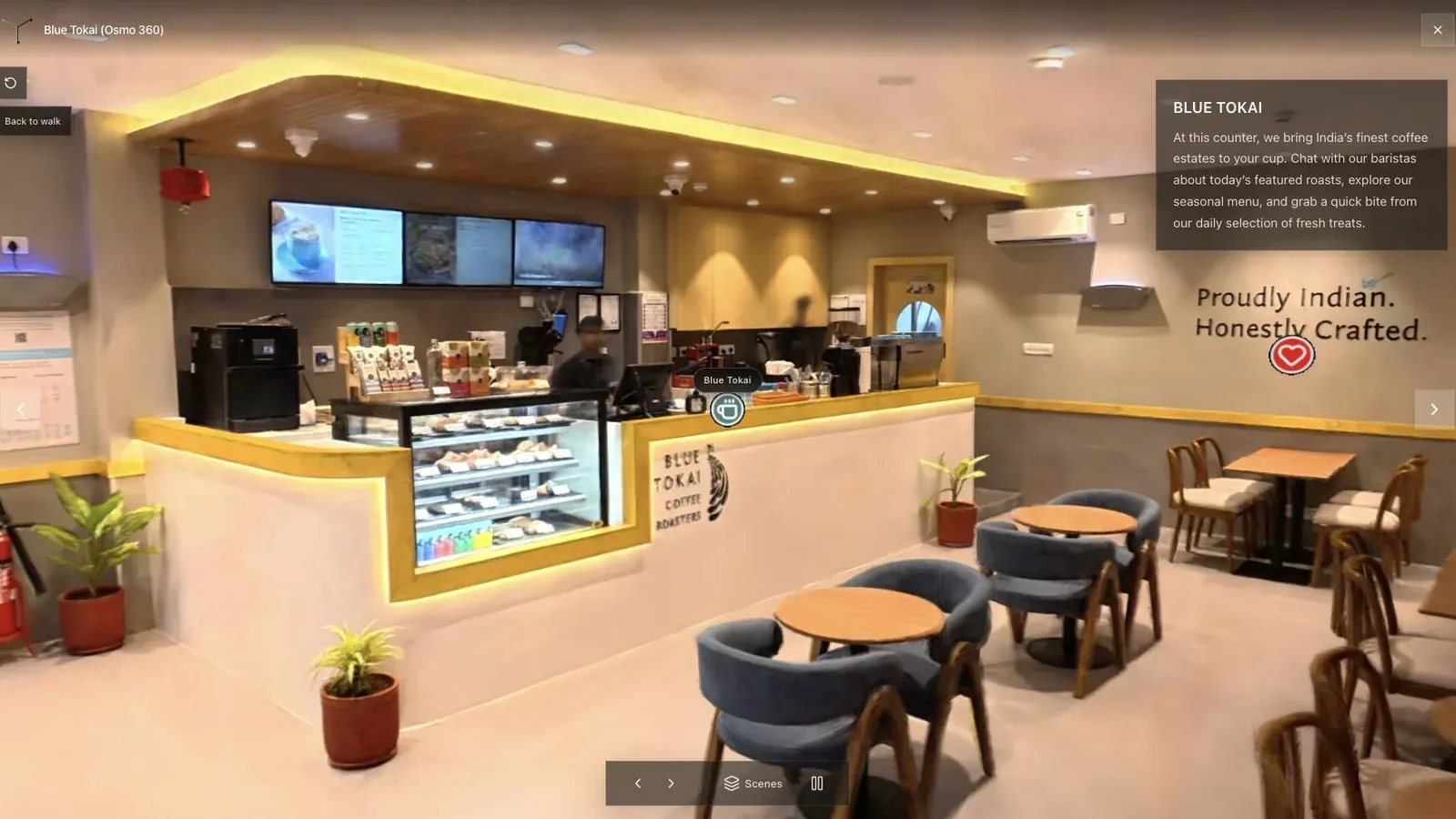
The cafe scene exposes stitching, glass, narrow routes, uneven light, and operator motion in one compact test.
Check the model in this order:
- Doorway continuity: can you move between rooms without a tear or sudden drift?
- Stitch band: do frames, signs, furniture edges, or window lines break where the lenses meet?
- Floor and camera path: is the operator route visible as a smear, shadow, or hole?
- Reflective surfaces: do mirrors and glass create duplicated geometry or floating detail?
- Thin objects: do railings, chair legs, plants, and trim hold together?
- Background coverage: does the scene collapse when you move away from the original route?
- Mobile delivery: does the published view load and navigate well outside the editor?
A strong hero view can hide a weak reconstruction. Follow the route a visitor would take before accepting the result.
Insta360, Splatica, and Spatial Studio
Insta360's 3DGS work did not begin with X6. Its Project Eternal program used X5 and Antigravity A1 footage with Splatica, Aholo, and MipMap. Insta360 describes a two-layer pipeline: capture in the INSV format, then send the media to a specialized reconstruction platform.
Splatica describes an automated route that accepts a short Insta360 video and returns a browser-viewable Gaussian splat with exports for VR and simulation workflows. That is useful evidence that consumer 360 capture can feed serious 3DGS work.
Spatial Studio overlaps at generation but extends into guided tour publishing. Use it when the deliverable needs a clear opening view, stops, labels, hotspots, a website embed, a business CTA, and analytics rather than only a reconstructed file or app memory.
Frequently asked questions
Does Insta360 X6 make Gaussian splats by itself?
The camera records the source. Insta360 says the footage is imported into the Insta360 app, where Spatial Capture generates the Gaussian-splat model. The processing is not described as happening entirely inside the camera.
Is Spatial Capture exclusive to X6?
No. Insta360 says it currently supports X6, X5, and X4 in selected modes. Availability can vary by region, and the company says more devices may be added later.
Is X6 automatically better than X5 for 3DGS?
Not automatically. X6 has newer imaging hardware and higher headline capture options, but a fair comparison requires the same route, lighting, processing path, and review criteria. Capture discipline can outweigh a spec advantage.
Can I export the X6 Gaussian splat?
Check the current Insta360 app and your region before buying around an export assumption. Insta360's product page confirms in-app generation and exploration; it does not make every external publishing or file-export requirement clear.
Can Spatial Studio process Insta360 footage?
Spatial Studio supports 360-video reconstruction workflows, but test the exact X6 recording mode and file path before a paid shoot. Use a supported direct file or high-quality export, then inspect the generated scene before publishing.
Should I buy X6 or wait for DJI Osmo 360 II?
X6 is a launched product with official specifications and an explicit Gaussian-splat workflow. Osmo 360 II has certification evidence but no indexed official global product page or confirmed 3DGS feature at the time of this update. Read the X6 versus Osmo 360 II research tracker before deciding.
Related reading
- Insta360 X6 vs DJI Osmo 360 II for Gaussian Splatting
- 360 Video to Gaussian Splatting for Real Estate
- DJI Osmo 360 Gaussian Splatting Guide
- Video to Gaussian Splat
- Indoor Gaussian Splatting Capture Guide
- Gaussian Splatting Software
Turn your X6 capture into something you can deliver
Record one difficult two-room route and test both Insta360 Spatial Capture and Spatial Studio's 360 generation workflow. Compare doorways, stitch lines, reflections, thin objects, background coverage, and mobile delivery. If the result is for a client, continue in Spatial Studio with guided stops, hotspots, floor-plan context, branding, embeds, and analytics instead of stopping at the first explorable model.
Next step
Open the related workflow.
Review live examples or move straight into the matching Spatial Studio flow.
Continue reading
Related articles
Capture Workflows
How to Make a Gaussian Splat on Mac from Photos or Video
Create a 3D Gaussian splat locally on an Apple silicon Mac from photos or video. Follow the capture, processing, review, export, and publishing workflow.
Read articleCapture Workflows
Photogrammetry vs Gaussian Splatting on Mac
Compare photogrammetry and Gaussian splatting on Mac by output, geometry, visual quality, capture, editing, measurement, hardware, and delivery workflow.
Read article