AI Property Guides: A Developer’s Buying and Testing Guide
Evaluate AI property guides for development sales: approved answers, room and amenity navigation, enquiry handoff, analytics and a practical launch checklist.
In this guide
How to assess an AI guide inside a property experience: approved project answers, useful navigation, sales handoff and practical tests before launch.
What is an AI property guide?
An AI property guide helps visitors ask questions while exploring a development, home or amenity. A useful guide connects its answers to the property on screen and helps the visitor continue: inspect a room, open a plan, understand an amenity or contact sales.
Evaluate that assistance against your approved information. Fluent answers alone are a poor acceptance test. A guide that describes the wrong home or invents availability can undermine otherwise careful presentation.
The following questions and tests are procurement recommendations. Individual FORM commissions and other suppliers’ products have their own agreed scope.
Define the questions the guide should answer
Start with the questions your team receives about layouts, amenities and specifications. Group them by source and decide what happens when the answer is missing.
| Buyer question | Approved information needed | Expected behaviour to test |
|---|---|---|
| “How large is this bedroom?” | Room dimensions for the selected home | Use the correct home and measurement unit |
| “Show me the pool.” | Named amenity and a valid tour destination | Navigate to the intended amenity and acknowledge the result |
| “Is that furniture included?” | Approved specification and styling notes | Distinguish supplied items from illustrative furnishing |
| “Is this apartment available?” | Current inventory source and update policy | Use verified status or offer sales confirmation |
| “Can I speak to someone about this home?” | Enquiry destination and unit identity | Preserve the chosen home through the agreed handoff |
For a multi-building project, unit identity should remain consistent with the interactive apartment selector. A question about one home should not silently inherit another home’s dimensions or price.
Ground answers in a maintained project record
“Grounding” means connecting AI output to verifiable information. Google Cloud’s documentation explains that providing specific data sources reduces the chance of invented content. It does not make an answer automatically correct.
For a development, prepare approved plans, room dimensions, finish schedules, amenity descriptions and frequently asked questions. Name an owner and review date for each source. Keep withdrawn information out of the current answer set.
Ask a supplier to demonstrate a changed specification: update one approved fact, then ask the same question again. Confirm how the change reaches the guide and how conflicting documents are handled. General web information should not become an authority for your project’s prices or delivery commitments.
Test a complete buyer conversation
Use a hypothetical example: a visitor is exploring apartment A-1204 and asks whether the balcony connects to the living room. The guide should use that home’s approved plan. If navigation is offered, the resulting view should support the answer.
The visitor then asks to see the gym, returns to the apartment and asks whether the shown furniture is included. This checks whether property context survives movement between a private home and shared amenities.
Finally, ask a question with no approved answer, such as an unannounced payment incentive. The expected response is an honest limit and the agreed route to sales. Record that as a successful handling of uncertainty, rather than rewarding a plausible guess.
Ask for evidence of the handoff
Agree what happens after “I’m interested in this apartment.” Is the next step an enquiry form, phone link or agent follow-up? Which details travel with it? Test the actual destination with a clearly marked test enquiry.
Request only the information your team needs. Decide whether a submitted enquiry includes the selected home, buyer-provided contact details and an agreed conversation summary. Document who can access those records and how long they are retained.
Treat CRM integration as a separate requirement with named fields, ownership and failure handling. A demonstrated enquiry inside a product does not establish that your chosen CRM is connected.
Run these acceptance checks before launch
Use a repeatable question set so suppliers and later releases can be compared on the same tasks:
- Property accuracy: ask the same question in two homes with different layouts or specifications.
- Missing information: remove a fact and check that the guide does not invent it.
- Navigation: request an amenity, interrupt the movement, and confirm where the visitor ends up.
- Updates: change an approved answer and verify that the published experience uses it.
- Device behaviour: try the agreed mobile browsers and a realistic connection; confirm manual exploration remains usable.
- Language: if multiple languages are in scope, test property names, currencies, measurements and sales wording in each.
- Handoff: submit a marked test enquiry and verify delivery and unit context.
If voice is included, add microphone-permission refusal, interruptions, background noise and recovery to the agreed tests. Define the acceptable response time with a representative experience; a desktop demonstration alone does not establish mobile performance.
Measure useful outcomes without overstating intent
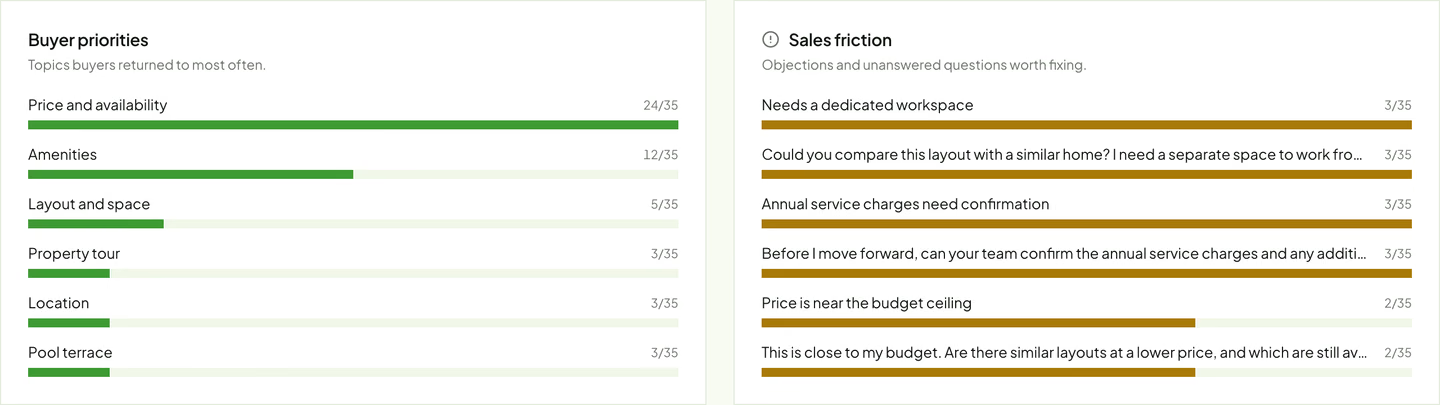
Track answered and unanswered question categories, navigation attempts, enquiry clicks and submitted enquiries separately. Review where visitors need human help and whether the sales team receives usable context.
Long conversations do not necessarily mean qualified buyers. They may reveal unclear information. Viewing attention based on direction and time is also different from eye tracking, purchase intent or a completed sale.
Start with one development and a defined review period. Compare actual questions with expected ones, then improve the project record and experience.
How FORM approaches the experience
FORM by Real Horizons is our commissioned architectural visualization and interactive property experience service. Its Aurelis concept demonstration connects exploration with an AI guide interface and sales insight. The property information, pricing, availability and analytics in that demonstration are illustrative.
Spatial Studio is the software for creating, publishing and managing spatial experiences. A FORM commission defines the production, guidance, information and delivery required for a particular development. CRM connections, inventory feeds and hosting requirements are agreed as project-specific work.
Include your question set in the architectural visualization brief. For the wider presentation, see off-plan property virtual tours.
Frequently asked questions
Is an AI property guide the same as a website chatbot?
A property guide is evaluated in the context of the home and spaces being explored. Ask to see how selected homes, answers and navigation stay connected.
Does the guide need live inventory?
Only if it is expected to answer current availability directly. Otherwise, define a clear sales-confirmation response. A static document should not be presented as a live inventory feed.
Can it replace a sales agent?
Plan it as assistance for exploration and routine project questions. Your team should own commercial commitments, unresolved questions and the agreed follow-up process.
Next step
Explore FORM
Explore the FORM concept demonstration, then discuss the approved property information, buyer questions and sales handoff your development needs.
Continue reading
Related articles
Property Development
Architectural Visualization Brief: A Developer’s Checklist
Prepare an architectural visualization brief with CAD/BIM inputs, deliverables, review stages and acceptance checks for a property development launch.
Read articleProperty Development
Interactive Apartment Selectors: A Developer's Planning Checklist
Plan an interactive apartment selector with clear unit IDs, floor plans, availability, mobile controls and enquiries that preserve buyer context.
Read articleProperty Development
Off-Plan Property Virtual Tours: What Developers Should Commission
Plan an off-plan property virtual tour with the right interiors, unit selection, design inputs, approvals and enquiry path for your development.
Read articleSplat Tools
PlayCanvas Gaussian Splatting: Import, Edit, and Publish
Follow the SuperSplat import, cleanup, publishing, and HTML export workflow. Compare a simple shared viewer with a custom PlayCanvas app or guided tour.
Read article