Interactive Apartment Selectors: A Developer's Planning Checklist
Plan an interactive apartment selector with clear unit IDs, floor plans, availability, mobile controls and enquiries that preserve buyer context.
In this guide
An interactive apartment selector should help a buyer move from a building to a relevant home and an informed enquiry. The difficult part is connecting the visualization, unit records and sales process accurately. Here is what to specify before commissioning one.
What is an interactive apartment selector?
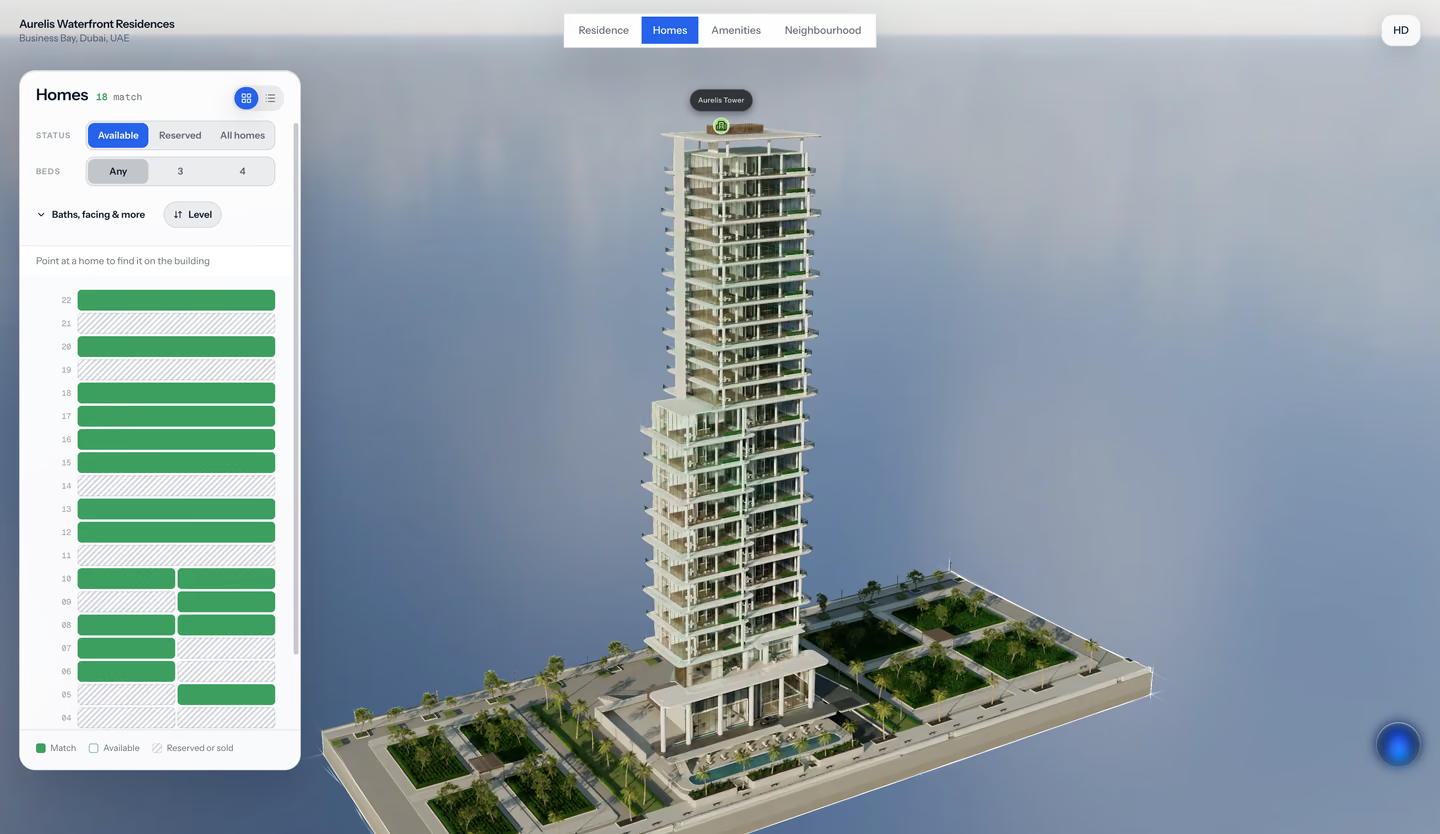
An interactive apartment selector connects a visual building or floor plan to individual home records. Buyers can choose a tower, floor or apartment and inspect the relevant details. Depending on the agreed scope, filters can help them find options by home type, area, price or other published attributes.
It is sometimes called a 3D unit selector, apartment finder or interactive building selector. The underlying presentation might use rendered building views, a real-time model or clickable plans. A smooth building rotation is only one part of the experience; the unit record must stay consistent as the buyer moves between views.
This article concerns apartments and multi-unit developments. For parcel boundaries, road access and land context, see interactive plot maps for land sales.
Specify the buyer journey before the rendering
Write down the decisions the buyer should be able to make and then ask the supplier to demonstrate them with a small, representative inventory sample.
| Step | What the buyer needs | What your team must supply |
|---|---|---|
| Choose a building | Location and relationship to the wider development | Approved site layout and building identifiers |
| Narrow the options | Understandable filters and matching units | Consistent unit attributes and status definitions |
| Inspect a home | Relevant plan, orientation and interior | Approved plans and the mapping to home types |
| Compare or return | A way to revisit the options being considered | Agreed navigation and shortlist behavior |
| Ask a question | A clear next step attached to the home | Enquiry destination and follow-up owner |
Current suppliers describe different combinations of these capabilities. Enluks presents facade selection and unit filters; The Boundary's Realspace positions interactive presentation within the wider sales process. Use the proposed journey to compare scopes rather than assuming products with similar labels deliver the same workflow.
Start with stable unit IDs and a data dictionary
Keep a persistent ID for each apartment, even if its public display name changes. The plan, visualization and sales record should refer to the same unit. Otherwise a renumbered apartment can retain the wrong floor plan or receive an enquiry intended for another home.
An example starting specification is below. The values are illustrative, not Aurelis inventory or a requirement to publish every field.
| Field | Illustrative value | Decision to resolve |
|---|---|---|
| Unit ID | T1-L08-0804 | Internal key that remains stable |
| Display label | Apartment 804 | Name shown to buyers |
| Home type | Two-bedroom B | Which approved layout and interior apply |
| Area | 92 m² | Measurement basis and display units |
| Status | Available | Exact meaning and who can update it |
| Price | On request | Public price, band or enquiry-only policy |
| Orientation | South-east | Reference used for the direction label |
| Plan revision | B-04 | Which approved drawing the buyer sees |
| Updated time | 22 September 2026 | When the displayed data was last checked |
Do not mix internal and saleable area in the same filter without explaining the distinction. Similarly, a range labelled “price” needs a consistent currency and basis. Keep the presentation appropriate for the markets you serve without assuming one country's terminology applies globally.
Choose an availability update process
There are three practical patterns to discuss: a managed inventory upload, an editable sales workspace, or a connection to an existing inventory system. Each needs an owner, validation rules and a defined response when data is unavailable.
With a file-based process, agree the update frequency and how rejected rows are reported. With an integration, agree which system is authoritative, which fields synchronize and how failed or delayed updates become visible. Do not let “live inventory” stand in for those decisions.
A reserved or sold unit needs an explicit buyer-facing behavior. It may remain visible for context while its enquiry action changes, or it may leave the available shortlist. Agree the intended result and test it. A selector is not automatically a reservation, deposit or contracting system.
Connect the apartment to the right interior
A specific apartment and a representative home type are different records. Multiple apartments may share a plan, but their floor level, outlook, balcony or finish options can differ.
Decide whether the interior represents the exact apartment or a typical layout. Label representative content and avoid implying that a pictured view belongs to every unit linked to it. Where the difference influences the buyer's decision, commission the additional content or provide a clear explanation beside the relevant view.
Our off-plan virtual-tour guide covers the production choices behind these interiors. The architectural visualization brief helps assign approvals and revision ownership.
Test mobile use, empty results and changed inventory
Build the acceptance check around ordinary tasks and difficult states:
- Find a home on a chosen floor without a mouse or hover interaction.
- Use a restrictive filter combination and confirm that no-results feedback is understandable.
- Clear the filters and recover the full available selection.
- Open a floor plan, inspect the relevant unit and return to the building.
- Change the test unit from available to reserved and confirm the agreed public behavior.
- Submit a test enquiry in the agreed test environment and verify its unit ID and destination.
- Open a saved link after an inventory update and check what happens if that unit is no longer available.
If a CRM connection is included, verify an actual test record reaching the agreed destination. A working button or successful browser event is not proof that the receiving system stored the enquiry.
Measure useful progression, not just rotations
Useful events may include building selection, filter use, unit detail views, plan opens and submitted enquiries. Decide which questions each event should answer before adding tracking.
A heavily viewed unit may have an appealing position, or its detail page may be confusing. Combine behavior with the questions buyers ask. Keep anonymous exploration separate from identified enquiries, and separate both from sales outcomes supplied by the sales team. In FORM, viewing attention measures direction and time; it does not reveal eye movement or establish purchase intent.
How FORM approaches the wider experience
FORM by Real Horizons is a commissioned service for architectural visualization and interactive property experiences. The Aurelis concept demonstration connects building and home selection with interiors, plans, amenities and sales insight. Its inventory and analytics are illustrative, not evidence of a client's sales performance.
The scope for a development is agreed individually. Bring your unit schedule, approved layouts, existing sales process and launch requirements. CRM connections, inventory feeds, hosting and specialist display requirements need explicit scoping. FORM is distinct from buying a self-serve Spatial Studio software plan.
Questions developers ask
Can we use existing architectural renders?
They may be useful inputs. A production review should confirm image rights, resolution, viewpoints, unit coverage and whether the renders can support accurate selection. One attractive exterior is not necessarily enough to identify every apartment.
Must the selector be a fully real-time 3D model?
No. Rendered views or interactive plans may serve the buyer's task. Ask to test the actual proposed format, transitions and mobile behavior before selecting the production approach.
What should we send with an enquiry about building a selector?
Send the unit schedule, approved floor plans, available building model or renders, required sales-system connections and target launch. Include the people who own design approvals and inventory updates.
Next step
Talk to FORM about your project
See how our commissioned property experiences bring home selection, interiors, plans and enquiry context together.
Continue reading
Related articles
Property Development
Off-Plan Property Virtual Tours: What Developers Should Commission
Plan an off-plan property virtual tour with the right interiors, unit selection, design inputs, approvals and enquiry path for your development.
Read articleProperty Development
AI Property Guides: A Developer’s Buying and Testing Guide
Evaluate AI property guides for development sales: approved answers, room and amenity navigation, enquiry handoff, analytics and a practical launch checklist.
Read articleProperty Development
Architectural Visualization Brief: A Developer’s Checklist
Prepare an architectural visualization brief with CAD/BIM inputs, deliverables, review stages and acceptance checks for a property development launch.
Read articleTool Comparisons
Insta360 X6 vs DJI Osmo 360 II for Gaussian Splatting
Compare Insta360 X6 and DJI Osmo 360 II for Gaussian splatting using confirmed facts, current unknowns, capture tests, and 3D-tour workflow needs.
Read article