What a Build-to-Rent Leasing Website Needs Before Completion
Plan a build-to-rent leasing website that lets homes before completion: home search by availability, furnished layouts, amenities, enquiries tied to the home and lease-up insight.
In this guide
A build-to-rent scheme has to let hundreds of homes in months, often to people who will never visit a show flat before they sign. The leasing website does most of that selling. Here is what it needs, what can wait, and how to brief it while the building is still a set of drawings.
The short answer
A build-to-rent leasing website has to let a renter find a home that fits, understand it well enough to apply, and reach the leasing team with that home attached. Before completion it also has to stand in for the show flat, because there is nothing to visit yet.
That means five things: a home search on the building with live availability, a furnished walkthrough of each home layout, the amenities, an enquiry that carries the chosen home, and data the leasing team can act on during lease-up. Everything else, from neighbourhood guides to resident app screenshots, supports those five.
Why build-to-rent is different from selling off-plan
A buyer of an off-plan apartment makes one large decision, usually after weeks of comparison and a visit to the sales gallery. A renter makes a smaller decision, faster, often from another city, and frequently on a phone. They compare your scheme with three others in an evening.
The operator's problem is also different. A developer selling off-plan needs reservations at launch. An operator needs occupancy: hundreds of homes let within the lease-up window, and then a steady flow of new renters as tenancies end. The website keeps working long after completion, so it has to be easy to keep current.
The five jobs the site has to do
1. Show what is free, on the building
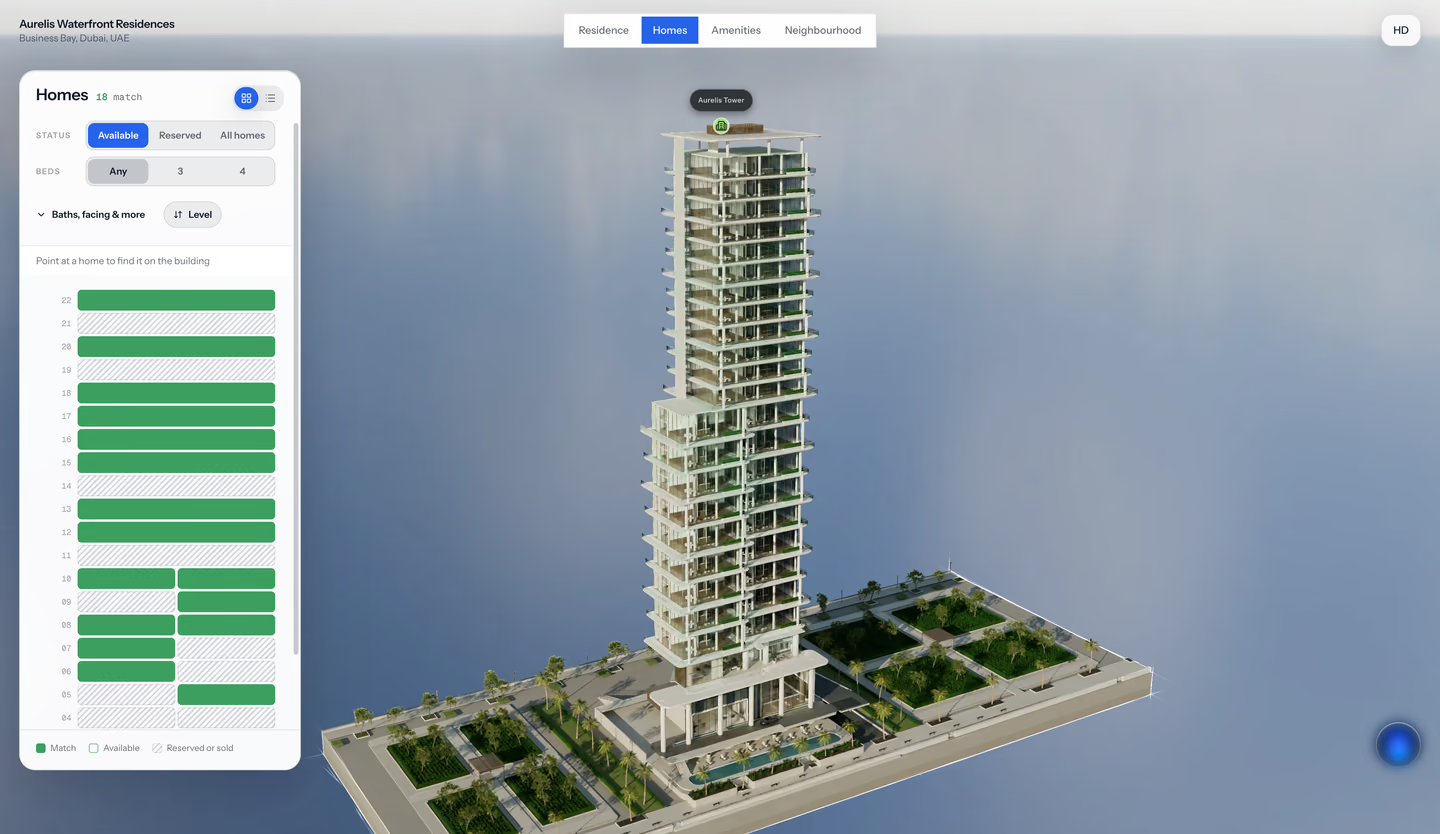
Renters want to see the building and choose a home on it: which floor, which side, which view. A list of flats with a "from" price hides the thing that makes one home better than another. An interactive building, coloured by availability, lets them filter by bedrooms, floor, aspect and size and see what is left.
Use the statuses your leasing team uses. "Available", "reserved" and "let" are clearer to a renter than a sales vocabulary of "sold" or "under offer". Hold back homes you are not marketing yet rather than showing them as taken.
2. Let renters walk through each layout
Before completion there is no show flat. A furnished walkthrough of each home type does that job. It does not need to exist for every apartment: one interior per layout, linked to every home of that type, covers a 400-home scheme with ten or twenty interiors.
Measured floor plans matter more for renters than buyers expect. People moving with furniture want to know whether the sofa fits. Show room dimensions beside the interior, with the compass, so the plan and the walkthrough agree.
3. Show the amenities as part of the home
Amenities are part of the rent. Lounges, co-working, gym, roof terrace, parcel rooms and the neighbourhood around the building are what separate a build-to-rent scheme from a flat on a portal. Show them as part of the same visit, not as a separate gallery page the renter has to find.
4. Carry the home into the enquiry
The most common leasing website failure is a generic contact form. The renter chose a two-bedroom on the eighth floor facing the park; the leasing team receives "Hi, is anything available?".
Every enquiry or viewing request should arrive with the home, floor, layout and status the renter was looking at. The team can then reply with that home, or the nearest alternative, in the first message.
5. Tell the leasing team what renters want
During lease-up, the questions change weekly. Which layouts are renters spending time on? Which floors do they skip? Do people who look at the roof terrace enquire more? A leasing dashboard that shows which homes, filters and amenities renters return to helps the team decide where to put incentives and which homes to photograph first once they are finished.
What can wait until later
Some features sound essential and are not on day one:
- A tour of every single apartment. One interior per layout is enough before completion. Add scanned tours of real show flats once they exist.
- Live availability feeds. A schedule the leasing team updates on an agreed rhythm works for launch. A direct feed from your property management system can come later, scoped as its own piece of work.
- Online applications and payments. Your property management system usually handles these. The website's job is to send a qualified enquiry there.
How to brief it
Send the studio the same pack you would send for an off-plan sale, plus the leasing details:
- Design files: CAD or BIM, or approved plans if that is all you have, with the revision you want built.
- Unit schedule: every home with its layout, floor, aspect and size, and how availability and pricing should appear.
- Interior specification: the finishes and furniture package renters will actually get, so the walkthrough does not promise more.
- Amenities and neighbourhood: what is shared, where it is, and which local places matter to your renters.
- Enquiry route: where enquiries go, who answers them, and which system they need to land in.
- Lease-up plan: launch date, practical completion date and how long the experience needs to stay live.
Our architectural visualization brief template covers the design side in detail. For selector specifics, see what makes a good apartment selector.
Common mistakes
- Marketing the building, not the homes. A beautiful hero film with no way to choose a home sends renters back to the portals.
- Promising finishes that are not in the rent. Walkthroughs should show the package renters get, with upgrades clearly labelled.
- A website nobody can update. If changing a status needs a developer, availability goes stale within weeks of launch.
- Losing the home at the enquiry. The renter's choice is the most useful thing the leasing team can know. Keep it attached.
- Desktop-first design. Renters browse on phones. Test every step on a mid-range phone on mobile data.
How FORM approaches build to rent
FORM by Real Horizons is our commissioned studio service. For build-to-rent schemes, we build the building, each home type furnished to your specification and the amenities from your design files, so renters can choose and walk through a home months before completion. Every enquiry reaches a lead inbox with the home attached, ready to export to your leasing system, and the leasing team sees which homes and amenities renters return to.
You can open the Aurelis demonstration to try choosing a home on a building. Aurelis is an illustrative concept, not a client scheme.
Questions operators ask
Is this worth it for a scheme that will be full within a year?
The leasing website keeps working after lease-up: every tenancy that ends needs a new renter, and the same building, layouts and amenities are still what you are marketing. The 3D work is done once and reused.
Can we use it in the marketing suite as well as online?
Yes. The same experience can run on a screen in the marketing suite and on the website, so renters see the same homes and statuses in both places.
Does it replace our property management system?
No. The website helps renters choose a home and enquire. Applications, referencing, contracts and payments stay in your property management system, and enquiries can be exported to it.
Next step
Talk to FORM about your scheme
FORM builds the building, the homes and the amenities from your design files, so renters can choose a home months before completion.
Continue reading
Related articles
Property Development
Interactive Apartment Selectors: A Developer's Planning Checklist
Plan an interactive apartment selector with clear unit IDs, floor plans, availability, mobile controls and enquiries that preserve buyer context.
Read articleProperty Development
Off-Plan Property Virtual Tours: What Developers Should Commission
Plan an off-plan property virtual tour with the right interiors, unit selection, design inputs, approvals and enquiry path for your development.
Read articleProperty Development
How to Brief an Architectural Visualization Studio: A Developer's Template
A practical template for briefing a studio to visualise your development: drawings, CAD/BIM files, finishes, audiences, deliverables, approvals and a copyable checklist.
Read articleProperty Development
Sales Gallery, Marketing Suite or Display Suite: What the Digital Experience Should Do
What the digital experience in a sales gallery, marketing suite or display suite should do: home selection, off-plan walkthroughs, agent presentations and enquiries that carry the chosen home.
Read article